Goodlights: The Handwritten Font That Brings Raw Energy to Your Designs
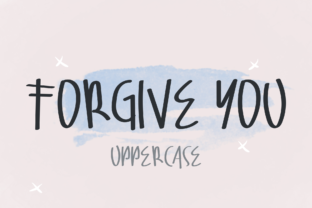
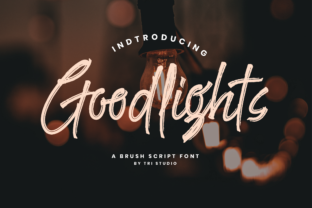
Imagine opening a design file and instantly feeling the energy of a sketchbook page—slightly uneven, full of life, unapologetically human. That’s the immediate impression Goodlights delivers. It’s not just another handwritten font. It’s a deliberate celebration of imperfection: ink bleeds subtly, strokes vary in weight, letters tilt with playful confidence, and every character feels like it was drawn in one confident motion—not traced, not smoothed, not sanitized.
More Than Just “Handwritten”—It’s Hand-Felt
What sets Goodlights apart isn’t just its visual roughness—it’s how that roughness serves intention. Unlike many script fonts that chase elegance or calligraphic precision, Goodlights leans into texture and rhythm. Its baseline wobbles just enough to feel alive. Some lowercase “a”s sit higher; some “t”s cross with a flick that suggests momentum. These aren’t inconsistencies—they’re intentional quirks that invite the eye to linger, to trace the path of the pen.
This isn’t about nostalgia for analog tools. It’s about translating the authenticity of hand-drawn expression into digital workflows—without sacrificing legibility or versatility. You’ll find Goodlights works surprisingly well at sizes as small as 14px in UI mockups (especially for playful CTAs or microcopy), yet it commands attention at 120px on a hero banner or event poster.
Where Goodlights Fits Naturally—And Where It Shines Brightest
Goodlights thrives where personality matters more than polish. Think of branding for indie bakeries, boutique studios, creative agencies, or wellness coaches who want warmth over corporate sterility. It’s equally at home on a sticker pack for a podcast about mental health as it is on limited-edition vinyl packaging for an indie folk band.
- Product packaging: A craft soap label using Goodlights for the scent name (“Honey & Thyme”) feels artisanal—not generic.
- Social media graphics: Instagram carousel slides highlighting “3 Ways to Start Your Morning Mindfully” gain instant approachability when headlines use Goodlights.
- Web banners & email headers: Swap sterile sans-serif hero text for Goodlights on a workshop sign-up page—and watch conversion lift by making the offer feel personal, not transactional.
- Print collateral: Wedding invitations, festival posters, or zine covers benefit from the tactile energy Goodlights brings—even before you add paper texture overlays.
Crucially, Goodlights avoids looking “cutesy” or juvenile. Its roughness reads as confident, not careless. That balance makes it adaptable across age groups and contexts—something many handwritten fonts struggle with.
Practical Integration: How Designers Actually Use Goodlights
In real-world projects, designers rarely drop Goodlights into every headline and body paragraph. Instead, they deploy it strategically—like a designer’s secret accent color.
Most successful uses follow a simple hierarchy: Goodlights handles short, high-impact text only—brand names, taglines, section headers, button labels, quote pulls. Pair it with clean, neutral typefaces (like Inter, Poppins, or even Georgia) for body copy. This contrast doesn’t fight—it amplifies. The handwritten font gains presence; the supporting type stays readable and grounded.
Need variety without visual chaos? Goodlights includes stylistic alternates—swash capitals, alternate “g” and “y” forms, and contextual ligatures that trigger automatically in OpenType-aware apps (Figma, Adobe Creative Cloud, Affinity Suite). Turn those on selectively to add subtle rhythm to longer words like “celebrate” or “together.”
And yes—it works beautifully in web environments. Hosted via Google Fonts or self-hosted with proper @font-face declarations, Goodlights renders crisply across devices. Just remember to declare fallbacks (font-family: 'Goodlights', cursive;) and test loading behavior. For performance-sensitive sites, consider limiting its use to above-the-fold headings only.
What Designers Consider Before Choosing Goodlights
Before committing to Goodlights, smart designers ask practical questions—not just aesthetic ones.
- Does the brand voice align? If your client’s tone is “authoritative financial advisor,” Goodlights may clash. But if it’s “your friendly neighborhood plant shop with strong opinions on soil pH,” it’s spot-on.
- How much text needs setting? Avoid long paragraphs. Its charm lives in brevity. If your layout demands extensive body copy in this style, reconsider—or explore complementary serif/sans pairings instead.
- What’s the output context? Print? Web? App UI? Goodlights scales well—but test at actual size. A 24px Goodlights headline looks energetic on screen but may feel cramped in tight print margins.
- Is licensing clear and fit for purpose? Check usage rights: Does your license cover commercial web embedding? Mobile app bundling? Merchandise? Most reputable sources (like Creative Market or the foundry’s own site) clarify this upfront—but never assume.
One underrated consideration: Goodlights pairs exceptionally well with hand-drawn icons, custom illustrations, or grainy photo textures. It’s part of a broader “authentic design language”—not a standalone flourish.
Why Goodlights Feels Fresh in 2024 (and Beyond)
In an era saturated with ultra-refined, AI-generated visuals and hyper-polished interfaces, Goodlights answers a quiet but growing need: human resonance. Users don’t just scan content—they sense tone. A perfectly kerned, geometric sans-serif says “efficient.” Goodlights says “I made this for you—not for an algorithm.”
That’s why it’s showing up in unexpected places: fintech dashboards adding warmth to onboarding tooltips, healthcare startups using it for patient education snippets, even B2B SaaS companies deploying it in release notes to soften technical updates. It’s not about dumbing down—it’s about lowering the barrier between information and empathy.
And unlike trend-driven fonts that fade after six months, Goodlights has staying power because its appeal isn’t novelty-based. It’s rooted in something timeless: the expressive power of the human hand. That’s why designers return to it—not as a gimmick, but as a reliable tool for connection.
Getting Started—Without Overthinking It
You don’t need to master calligraphy or spend hours adjusting letter spacing to use Goodlights effectively. Start simple:
- Download the OTF or WOFF2 version from a trusted source.
- Type a single word—“Hello,” “Now,” “Yes”—in Figma or Illustrator at 48px. Adjust tracking slightly (+20–+40) to let the shapes breathe.
- Try it over a soft watercolor background or against raw kraft paper texture.
- Ask yourself: Does it feel inviting? Does it match the emotional temperature of the message?
If yes—you’ve already unlocked its core value. Refinement comes later. Intention comes first.
At its heart, Goodlights is a reminder: great typography doesn’t have to be flawless to be functional—or unforgettable. Sometimes, the most powerful statement isn’t drawn with precision. It’s drawn with presence. And that’s exactly what Goodlights delivers—every time.