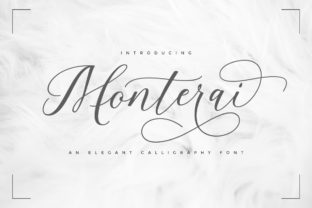
Monterai: A Handwritten Font for Romantic, Delicate Design Moments
Monterai isn’t just another script font—it’s a deliberate design choice that signals warmth, intimacy, and intentionality. As an incredibly sweet and stunning handwritten typeface, Monterai bridges the gap between personal expression and professional polish. It doesn’t shout; it leans in. That makes it especially valuable for creators who understand that tone is as important as content—and that typography is one of the most immediate, subconscious ways to shape how a message lands.
Where Monterai Fits in Your Creative Workflow
Fonts aren’t selected in isolation—they’re chosen at specific points in a process, often after strategy but before finalization. Monterai typically enters the workflow during the refinement or emotional calibration phase: when you’ve defined your audience, clarified your core message, and now need to reinforce mood without compromising clarity. It’s rarely the first font you try—but it’s frequently the one that resolves a “something’s missing” feeling in a layout.
For example, a small business owner designing a wedding invitation suite might start with clean sans-serifs for structure and hierarchy, then layer in Monterai for names, dates, or short poetic lines. A blogger crafting a heartfelt newsletter about self-care might use Monterai only for the subject line or a pull quote—just enough to signal tenderness without sacrificing readability in body text. The decision isn’t arbitrary; it’s contextual, intentional, and timed.
Using Monterai Before, During, and After Key Milestones
Before a project: Monterai helps set creative boundaries. If you know upfront that Monterai will anchor certain elements—say, product labels for a handmade candle line or headers for a mindfulness journal—you can plan spacing, contrast, and pairing fonts accordingly. This avoids last-minute compromises like shrinking text to fit or switching fonts mid-design because the original choice didn’t scale well.
During execution: Monterai works best when treated like a precision tool—not a default. Its delicate strokes mean it thrives at larger sizes (24pt and up for print, 32px+ for web display) and benefits from generous letter-spacing and line-height. When used in digital interfaces, always test contrast against backgrounds. A soft lavender background may look dreamy in mockups but fail WCAG contrast checks—so pair Monterai with tested, accessible color combinations early, not after export.
After launch: Consistency matters. If Monterai appears on your website’s “About” page and social media graphics, maintain that usage across touchpoints. Reuse the same weight, spacing rules, and typographic hierarchy. This builds visual recognition over time—especially helpful for service-based businesses or personal brands where emotional resonance strengthens trust.
Integration With Other Tools and Assets
Monterai integrates cleanly into common design and publishing ecosystems—but success depends on preparation. In Adobe Creative Cloud, install the OTF version for full OpenType features like ligatures and stylistic alternates. These subtle variations (like a swash capital “Q” or connected “f-l” pair) add authenticity but require manual activation in Illustrator or InDesign—don’t assume they’ll auto-apply.
In Canva, Monterai is available as a premium font. Because Canva renders fonts differently than desktop apps, preview exports at actual size before finalizing. On websites, serve Monterai via @font-face using a reliable host (like Google Fonts if available, or self-hosted via your CDN). Avoid loading it as part of a massive font stack—Monterai performs best when it’s purposefully called, not buried in fallback chains.
When combining with photography or illustration, Monterai pairs well with soft-focus imagery, muted palettes, and organic textures—linen, watercolor, pressed flowers. It clashes with high-contrast neon graphics or rigid geometric layouts unless deliberately juxtaposed for irony or contrast. Think of it as a collaborator: it enhances what’s already emotionally grounded, rather than transforming something inherently clinical.
Practical Implementation Tips
- Start with hierarchy: Use Monterai only for primary emphasis—headlines, quotes, names—not body copy, captions, or navigation. Reserve it for moments where human connection is the goal.
- Pair intentionally: Combine with a highly legible sans-serif (like Poppins, Lato, or Inter) for balance. Avoid other scripts or overly decorative fonts—Monterai needs breathing room to shine.
- Test real-world legibility: Print a sample at 12pt on your intended paper stock. View web versions on mobile screens indoors and outdoors. If letters blur or connections disappear, increase size or tracking.
- Limit variants: Monterai includes regular and alternate glyphs—but avoid mixing too many alternates in one block. One thoughtful swash per headline is more effective than three competing flourishes.
- Document usage: Save a style guide snippet showing approved sizes, colors, spacing, and examples. Share it with collaborators or contractors so Monterai remains consistent—even when you’re not in the file.
Long-Term Usability and Quality Control
Monterai holds up well over time—if used with discipline. Its romantic character doesn’t age poorly, but inconsistent application does. A brand that uses Monterai for wedding invites but switches to a bold condensed sans for holiday cards sends mixed signals about voice and values. Audit your assets annually: do all Monterai instances follow the same sizing, spacing, and color rules? Are outdated mockups still circulating internally?
Also consider licensing. Monterai is a commercial font—verify your license covers your use case: web embedding, app integration, merchandise, or client deliverables. Some licenses restrict redistribution (e.g., giving a client the font file), so build that into contracts or delivery checklists. Nothing disrupts workflow continuity like a cease-and-desist over unlicensed font use.
Real-World Workflow Examples
Educators creating printable resources: A Montessori teacher designs emotion cards for elementary students. She uses Monterai for the feeling word (“calm,” “brave,” “tender”) and a simple sans-serif for the definition and example sentence. The contrast supports cognitive processing while honoring the emotional weight of the content.
Freelance designers building brand identities: For a new herbal apothecary, Monterai anchors the logo lockup and ingredient labels—paired with hand-drawn botanical illustrations. Later, when developing email templates, the designer reuses the exact same Monterai settings from the brand guide, ensuring cohesion across digital and physical touchpoints.
Bloggers planning seasonal content: Ahead of Valentine’s Day, a relationship coach sketches her post outline, then blocks space for Monterai-used headings and pull quotes. She writes the copy first in plain text, then applies Monterai only where phrasing benefits from its lyrical rhythm—never forcing the font to carry weak writing.
Final Thought: Monterai as a Signal, Not a Solution
Monterai won’t fix unclear messaging, poor user experience, or mismatched branding. But when aligned with thoughtful strategy, it becomes a quiet amplifier—deepening resonance where it counts. Its value isn’t in ubiquity, but in restraint. Use it to highlight what already matters: a name, a promise, a moment of sincerity. Done well, Monterai doesn’t distract from your work—it helps people feel it more deeply.