Flash Script: A Bold Handwritten Font That Elevates Intent, Not Just Aesthetics
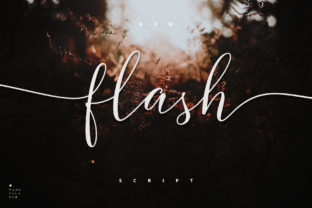
Flash Script isn’t just another handwritten font—it’s a deliberate typographic tool with visual weight, rhythmic energy, and expressive confidence. Its thick-to-thin strokes, subtle bounce, and confident slant communicate authenticity without sacrificing polish. When used intentionally, Flash Script doesn’t merely decorate text; it signals priority, personality, and presence. For professionals who make decisions daily—whether choosing a brand voice, designing a workshop slide, or launching a product page—this font can serve as a quiet strategic lever.
Why Flash Script Fits Real-World Decision-Making
Typography influences perception faster than most realize. Studies in cognitive psychology show that readers assign traits like “trustworthy,” “innovative,” or “approachable” within milliseconds of encountering type—even before reading a single word. Flash Script leans into that immediacy. Its boldness commands attention without shouting; its handwritten quality suggests human involvement, not automation. That makes it especially useful when your goal is to humanize scale: a small business owner introducing a new service line, an educator designing course materials that feel welcoming, or a freelancer presenting a portfolio that balances creativity with competence.
Unlike overly casual script fonts that risk looking unpolished or difficult to read at smaller sizes, Flash Script maintains clarity at 24pt and above. Its letterforms are open, legible, and consistent—designed for impact, not ornamentation. That balance is why it works across contexts where credibility matters: event banners, social media headers, email subject lines, presentation titles, and even physical signage for pop-up shops or community workshops.
Where Flash Script Delivers Strategic Value
Consider these practical use cases—not as design trends, but as outcomes-driven choices:
- Brand positioning: If your brand stands for bold ideas, creative confidence, or hands-on expertise (e.g., a design studio, coaching practice, or craft-based product line), Flash Script in headlines reinforces that stance visually—before the first sentence is read.
- Content hierarchy: Use Flash Script only for primary headings—never body copy—and pair it with a clean, neutral sans-serif (like Inter, Lato, or Open Sans) for supporting text. This contrast creates rhythm, improves scannability, and directs attention where it matters most.
- Customer experience cues: On landing pages or checkout flows, Flash Script in a headline like “Your Custom Kit Ships Tomorrow” adds warmth and urgency without sounding transactional. It subtly shifts tone from functional to personal.
- Learning & engagement: Educators and trainers report higher recall when key concepts are introduced with distinctive, memorable typography. Flash Script used sparingly on slide titles or handout section headers helps learners anchor information emotionally—not just cognitively.
What to Consider Before You Apply Flash Script
Like any strong tool, Flash Script amplifies intent—but also magnifies misalignment. Using it without clear purpose invites inconsistency, not charisma. Ask yourself these questions before applying it:
- Is this the most important message on the page—or am I using it to compensate for weak copy? Flash Script won’t fix vague value propositions or unclear calls to action. It highlights what’s already working.
- Does this context reward personality—or require neutrality? Legal disclaimers, data tables, accessibility-critical interfaces, or multi-step forms benefit from predictability, not flourish. Reserve Flash Script for moments where emotional resonance supports the objective.
- Who sees this first—and what do they need to feel, not just see? A potential client scanning your homepage in under three seconds needs clarity and trust—not novelty. Flash Script earns its place when it answers an unspoken question: “Who’s behind this?”
Also consider technical fit. Flash Script includes OpenType features like ligatures and alternate characters—but only if your platform supports them. Web use requires proper loading via @font-face or a trusted provider like Google Fonts (if available there) or Adobe Fonts. Self-hosted files should include WOFF2 for performance. Avoid embedding it in PDFs meant for print unless you’ve confirmed glyph consistency across devices.
How to Use Flash Script With Intention—Not Decoration
Intentional use starts with restraint. Think of Flash Script as a spotlight—not stage lighting. One well-placed headline per layout is often enough. Two risks visual competition; three reads as clutter.
Pairing matters. Flash Script thrives alongside typefaces with strong x-heights and generous spacing. Avoid thin serifs or ultra-condensed sans-serifs—they create imbalance. Instead, try pairing with:
- Inter (for digital interfaces and dashboards)
- IBM Plex Sans (for reports, whitepapers, and documentation)
- Work Sans (for presentations and printed handouts)
Color choice also affects perception. Flash Script in deep navy or charcoal feels grounded and professional; in burnt orange or forest green, it gains warmth and approachability; in black on white, it reads as confident and direct. Avoid low-contrast combinations (e.g., light gray on white)—they undermine its strength and hurt accessibility.
Long-Term Brand Consistency Is Non-Negotiable
A font becomes part of your brand’s vocabulary only when used consistently—not just occasionally. If you introduce Flash Script in your Instagram Stories banner, it should echo in your newsletter header and website hero section. Inconsistency confuses recognition. Worse, it suggests indecision—not creativity.
Document usage rules early: specify size ranges, color values, pairing guidelines, and prohibited contexts (e.g., “Never used in footer links or error messages”). Share that with anyone who touches your brand assets—even contractors or interns. That small step prevents drift and preserves strategic coherence over time.
Risks of Misusing Flash Script
The biggest risk isn’t poor aesthetics—it’s diluted messaging. When Flash Script appears without alignment to voice, audience, or goal, it sends mixed signals. A financial advisor using it on a retirement planning guide may unintentionally signal informality over authority. A university department using it across all internal memos might erode perceived rigor.
Another risk is overuse across touchpoints. Seeing the same energetic script on a pricing page, a support ticket response, and a compliance notice flattens meaning. Context gives Flash Script its power; stripping away context strips away its usefulness.
Finally, accessibility must be non-negotiable. Flash Script is unsuitable for body text, alt text, or any interface element requiring screen reader compatibility. Always test contrast ratios (aim for 4.5:1 minimum against background), and never rely solely on font style to convey meaning—use icons, labels, or structure instead.
Practical Planning Tips for Immediate Use
You don’t need a full rebrand to begin using Flash Script thoughtfully. Start small:
- Add it to your next email campaign headline—then track open rates and click-throughs vs. previous versions. Look for shifts in engagement, not just aesthetics.
- Apply it to one recurring slide template (e.g., “Key Takeaway” in presentations) and observe how audiences respond during Q&A or follow-up discussions.
- Use it in a single customer-facing micro-interaction—like a success message after form submission (“You’re all set!”)—and note qualitative feedback in support logs.
Track what works—not just what looks good. Over time, patterns will emerge: which audiences respond best, which goals align most naturally, which contexts yield measurable lift in attention or action.
Flash Script isn’t about being “cool.” It’s about communicating with clarity, confidence, and care. When chosen deliberately—and paired with strong strategy, thoughtful content, and consistent execution—it becomes more than a font. It becomes part of your professional signature.