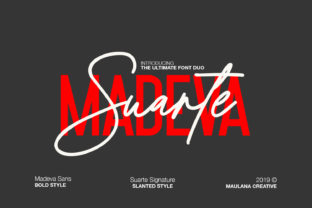
Madeva Suarte: A Bold Font Duo That Elevates Design With Purpose
When typography stops being just readable—and starts commanding attention, evoking mood, and reinforcing brand voice—that’s when a font like Madeva Suarte earns its place in your toolkit. It’s not just another display typeface. Madeva Suarte is a thoughtfully crafted font duo: one part elegant, structured serif; the other, a confident, high-contrast sans-serif with a bold twist. Together, they form a rare harmony—versatile enough for editorial layouts, sharp enough for digital interfaces, and expressive enough for luxury branding.
What Makes Madeva Suarte Stand Out?
At first glance, Madeva Suarte feels familiar—but look closer, and you’ll notice deliberate, modern refinements. The serif version balances classical proportions with subtle geometric undertones: crisp serifs, open counters, and a vertical stress that gives it presence without stiffness. Its x-height is generous, ensuring strong legibility even at smaller sizes—unusual for a display-oriented serif.
The sans-serif counterpart isn’t just a neutral companion. It’s bolder, literally and figuratively: increased stroke contrast, tightened letter spacing, and a slight upward tilt in certain characters (like the lowercase a and e) that injects quiet energy. This isn’t a “safe” sans—it’s intentional, distinctive, and designed to pair—not compete—with its serif sibling.
That pairing is where Madeva Suarte shines brightest. Unlike many font duos built on contrast-for-contrast’s-sake, this set shares underlying rhythm and optical balance. The cap heights align. The ascenders and descenders breathe in sync. Kerning between them feels natural—not forced. You don’t need custom spacing adjustments to make headlines and body text coexist. They just do.
Real-World Use Cases: Where Madeva Suarte Fits Naturally
Designers reach for Madeva Suarte when they need clarity *and* character—without sacrificing professionalism. Here’s how it works across contexts:
- Luxury & Lifestyle Brands: A boutique hotel’s website uses the serif for headlines (“Our Story”, “The Terrace”) and the sans for subheads and call-to-action buttons (“Book Now”, “Explore Amenities”). The contrast signals heritage and modernity in one glance—no extra imagery required.
- Publishing & Editorial Design: A quarterly arts magazine deploys the serif for feature titles and pull quotes, while the sans handles captions, bylines, and navigation menus. Readers instantly parse hierarchy—and linger longer because the texture feels considered, not generic.
- Product Packaging: A small-batch skincare line prints ingredient lists in the sans (clean, precise, trustworthy) and brand name + tagline in the serif (refined, artisanal, human). Shelf impact increases—not from loud colors or gimmicks, but from typographic intention.
- Digital Interfaces: On mobile, the sans renders crisply at 14–16px for labels and buttons, while the serif scales beautifully for hero banners or onboarding screens. Its OpenType features—including stylistic alternates and discretionary ligatures—add polish without bloating load time.
Why Pairing Matters More Than Ever
In an age of algorithm-driven design systems and AI-generated layouts, thoughtful font pairing is a quiet act of resistance—and relevance. Users scroll past homogenized UIs in under two seconds. But when Madeva Suarte appears, something shifts: the eye pauses. Not because it’s flashy, but because it feels *resolved*. There’s no visual tension between headline and paragraph—just calm authority.
This matters especially in responsive environments. Many duos break down on smaller viewports—serifs get muddy, sans-serif weights lose distinction. Madeva Suarte was tested across devices. Its hinting is refined. Its variable axes (where available) allow smooth interpolation between text and display grades. That means one family can serve both a desktop homepage banner and a mobile notification—without swapping fonts or compromising tone.
Practical Considerations Before You Adopt Madeva Suarte
Like any powerful tool, Madeva Suarte rewards informed use—and reveals limitations if applied carelessly. Here’s what smart designers check first:
- Licensing Scope: Confirm whether your intended use—web, app, print, merchandise—is covered. Some licenses restrict embedding in SaaS platforms or white-labeled tools. If you’re building a client-facing dashboard, verify multi-domain web font hosting permissions.
- Weight Range & Language Support: Madeva Suarte offers four core weights per style (Light, Regular, Medium, Bold), plus matching italics. It supports Latin Extended-A, Vietnamese, and basic Cyrillic—ideal for EU or bilingual North American projects. But if you need full Greek or Arabic support, check the foundry’s latest spec sheet.
- Performance Impact: At ~180KB total (WOFF2, all weights), it’s leaner than many premium duos. Still, prioritize critical weights: load Regular + Bold for the serif, Medium + Bold for the sans. Defer lighter weights or use
font-display: swapto avoid invisible text during load. - Brand Alignment Check: Does your brand voice lean toward warmth or precision? Tradition or disruption? Madeva Suarte leans sophisticated—but not cold. It won’t suit a playful children’s app or a gritty streetwear label aiming for raw authenticity. It thrives where confidence meets craft.
Getting the Most From the Duo: Simple Pairing Principles
You don’t need complex systems to leverage Madeva Suarte. Start here:
- Headline + Body = Serif + Sans: Use the serif for H1–H2, the sans for H3–paragraphs, buttons, and captions. Avoid reversing this unless you’re intentionally subverting expectations (e.g., a tech startup using the serif for code snippets to suggest stability).
- Scale With Confidence: Try a 24px serif headline over 16px sans body. Increase the ratio to 30px/17px for hero sections. The duo’s optical sizing means larger sizes feel substantial—not oversized.
- Embrace the “Bold Twist”: Don’t shy away from the sans-serif’s heaviest weight. Use it for CTAs, section dividers, or short quotes. Its contrast makes emphasis feel earned—not arbitrary.
- Whitespace Is Your Co-Designer: Both fonts breathe well, so give them room. Increase line-height to 1.55–1.65 for body text. Let the serif’s serifs and the sans’s clean terminals define the rhythm—don’t crowd them.
Beyond Aesthetics: How Madeva Suarte Supports Strategic Design Goals
Typography influences perception faster than color or layout. Studies show users associate high-contrast serifs with trust and authority—and geometric sans-serifs with efficiency and innovation. Madeva Suarte merges those associations deliberately. That duality helps brands communicate layered messages: “We’re established, yet forward-thinking.” “We honor tradition, but build for today.”
It also reduces decision fatigue. When teams debate font choices, Madeva Suarte simplifies the conversation: “We’ll use the serif for voice-driven content, the sans for functional elements.” No more debating which Google Font looks “premium enough.” No more licensing three separate families to cover all bases.
And for developers? Its CSS-friendly naming (font-family: "Madeva Suarte Serif", "Madeva Suarte Sans") and consistent fallback behavior mean fewer cross-browser surprises. Variable font options (if licensed) cut HTTP requests—critical for Core Web Vitals scores.
In short, Madeva Suarte isn’t just about looking good. It’s about working smarter—supporting readability, reinforcing identity, and scaling gracefully across touchpoints. When your typography does that consistently, your message doesn’t just land. It resonates.