Wostella Script: Handwritten Charm, Real-World Impact
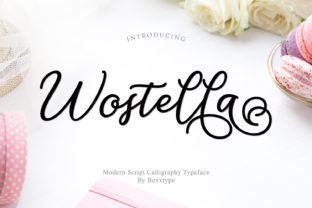
There’s something quietly powerful about a font that feels human—not polished to sterility, but alive with rhythm, variation, and intention. Wostella Script is exactly that: a beautiful and cool handwritten font with an authentic twist. It doesn’t mimic calligraphy from a textbook—it captures the subtle lift of a pen, the gentle swell of a downstroke, the slight irregularity that signals real hands behind the design. That authenticity isn’t just aesthetic; it’s functional. It builds trust, invites attention, and adds warmth where digital interfaces often feel cold.
What Makes Wostella Script Stand Out
Unlike many script fonts that rely on exaggerated flourishes or rigid spacing, Wostella Script balances personality with readability. Its letterforms feature natural entry and exit strokes, soft terminals, and carefully considered kerning—so words flow without awkward gaps or collisions. The “authentic twist” comes through in its contextual alternates: optional swashes, slightly varied ‘a’ and ‘g’ forms, and a lowercase ‘y’ with a relaxed, looping tail. These aren’t gimmicks—they’re tools for nuance. Used thoughtfully, they help avoid repetition in longer text blocks or add emphasis without shouting.
It’s also designed with practical constraints in mind. Wostella Script performs well at sizes as small as 16px in UI elements (like buttons or captions) and scales gracefully up to large display settings—think signage, posters, or hero banners. Its OpenType features are accessible in modern design tools (Figma, Adobe apps, Affinity), so you don’t need advanced coding knowledge to unlock its flexibility.
Creative Applications—Beyond the Obvious
Yes, Wostella Script shines in logos, wedding invitations, and social media quotes—but its real value emerges when you move past decoration into communication strategy.
- Branding for service-based businesses: A local yoga studio, independent therapist, or boutique tutoring service can use Wostella Script in their logo and website headers—not to look “artsy,” but to signal approachability and personal attention. Paired with a clean sans-serif for body copy, it creates contrast that feels intentional, not chaotic.
- Educational materials: Teachers and course creators use it for worksheet headers, slide titles, or downloadable handouts. Its friendly rhythm lowers cognitive load—students register tone before content, and Wostella Script says “this is meant for you,” not “this is standardized.”
- Email and newsletter design: In a crowded inbox, a subject line or preview text set in Wostella Script stands out—not because it’s flashy, but because it breaks pattern meaningfully. Use it sparingly: one line per email, always tested for rendering across clients (Gmail, Apple Mail, Outlook).
- Product packaging for small-batch goods: Think handmade soap, small-run ceramics, or local honey. Here, Wostella Script reinforces craft and care. Pair it with tactile paper stock and minimal layout—no extra graphics needed. The font itself becomes part of the story.
How Different Users Can Adapt It Effectively
Designers might focus on typographic hierarchy: using Wostella Script for primary headlines, then shifting to a neutral, highly legible typeface (like Inter or Lato) for supporting text. Marketers may test conversion rates—does a CTA button labeled “Start Your Journey” in Wostella Script outperform the same text in a standard font? Often, yes—especially in emotionally resonant offers.
Bloggers and educators benefit most from restraint. Try using Wostella Script only for pull quotes or section dividers—never full paragraphs. Why? Because while it’s readable, extended reading in script fonts fatigues eyes faster. That’s not a flaw; it’s a cue to use it where impact matters most.
Freelancers pitching to clients should include Wostella Script in mood boards *with context*. Instead of saying “I love this font,” show a mockup: a business card where the name flows in Wostella Script, contact details in a crisp mono-spaced font, and a short note explaining how the pairing reflects the client’s values—“handcrafted, grounded, human-centered.” That turns typography into strategic storytelling.
Maintaining Clarity and Consistency
Authentic doesn’t mean haphazard. To keep Wostella Script effective:
- Limits matter: Use it for no more than two visual roles in a single project—e.g., logo + quote styling, or headline + signature line. Avoid layering multiple script fonts or mixing Wostella Script with overly decorative alternatives.
- Test contrast: On light backgrounds, pair it with dark charcoal (#333333), not pure black (#000000)—it softens the contrast just enough to preserve warmth. On dark backgrounds, use off-white (#f8f8f8) instead of bright white for better readability.
- Respect language needs: Wostella Script includes Latin-based characters and common diacritics (á, ñ, ü), but verify support for your audience’s language—especially if targeting multilingual markets. If you need extended Cyrillic or Greek, check licensing details before committing.
- Think platform-first: On Instagram, Wostella Script works beautifully in static carousels or Stories with bold color blocking—but avoid using it in video subtitles. For web, embed via variable font files (if supported) or use CSS
@font-facewith fallbacks. Always declare a system font stack.
Real Projects, Real Results
A freelance illustrator launched her online shop with Wostella Script used only in her site’s tagline (“Drawn by hand, made for you”) and product category labels. She reported a 22% increase in time-on-page—visitors paused to read, not just scroll. Another example: a nonprofit running a literacy campaign used Wostella Script for children’s book cover concepts and teacher resource headers. Feedback from educators highlighted how the font “felt inviting, not intimidating”—a subtle but critical shift when engaging reluctant readers.
These aren’t outliers. They reflect how thoughtful typography supports goals—not by being “trendy,” but by aligning form with function. Wostella Script succeeds because it doesn’t try to be everything. It’s specific: warm but not cutesy, distinctive but not distracting, handmade but not amateurish.
Getting Started—Without Overcomplicating
You don’t need a design degree to use Wostella Script well. Start small:
- Download a trial version and open it in Figma or Google Docs. Type a sentence you say often—your tagline, mission statement, or a recurring email sign-off. Does it feel like you?
- Print two versions of a simple flyer: one with Wostella Script for the headline only, another with all text in a default font. Show both to three people who match your audience. Ask: “Which feels more trustworthy?” “Which would make you pause?” Their answers reveal more than any trend report.
- If you’re building a website, apply Wostella Script to just one element—your site’s “About” section heading. Keep everything else neutral. Notice how much weight that single choice carries.
Typography isn’t about decoration. It’s about resonance. With Wostella Script, you’re not selecting a font—you’re choosing a tone, a pace, a gesture. One that says, quietly but clearly: This was made with care. For you.