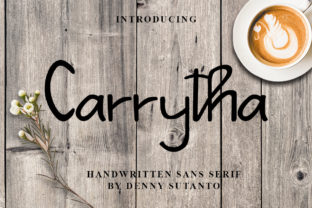
Carrytha: A Handwritten Font That Fits Seamlessly Into Real Creative Workflows
Carrytha isn’t just another decorative script font. It’s a simple yet elegant handwritten typeface with a cool, relaxed confidence—designed to integrate naturally into how people actually work, not how design trends say they should. Whether you’re sketching a pitch deck before a client meeting, drafting a newsletter for your small business, or refining lesson materials for your classroom, Carrytha adds personality without sacrificing clarity or professionalism.
Its strength lies in its balance: the letterforms have subtle variation and gentle rhythm—enough to feel human and approachable—but remain highly legible at medium sizes and across digital and print formats. That makes it unusually versatile for creators who need consistency across touchpoints, not just visual flair in isolation.
Where Carrytha Fits in Your Workflow
Most fonts are chosen at the end of a project—as polish, not process. Carrytha works differently. Because it’s both distinctive and functional, it often becomes part of the early decision-making phase: defining tone, reinforcing brand voice, or setting expectations before content is fully written.
For example, a freelance educator building an online course might select Carrytha during the syllabus wireframing stage—not just for headers, but to preview how learning objectives will feel when read aloud (or scanned quickly). That early alignment helps avoid rework later. Similarly, a small business owner designing a seasonal product launch email might use Carrytha in their first internal draft to test whether the messaging feels warm and grounded—not stiff or overly casual.
In these cases, Carrytha isn’t applied *to* the work—it helps shape the work itself.
Using Carrytha Before the Project Begins
Preparation matters. Before opening a design tool or writing a single paragraph, consider how Carrytha supports your goals:
- Tone calibration: Paste a short mission statement or value proposition into a mockup using Carrytha. Does it reflect sincerity? Approachability? Craftsmanship? If not, that’s useful feedback—before you invest time in visuals or copy.
- Platform compatibility check: Carrytha is webfont-ready (WOFF2) and includes OpenType features like ligatures and alternate characters. Test it in your CMS, email builder, or presentation software early—even if just as a placeholder—to confirm rendering consistency across devices.
- Team alignment: Share a one-page style reference with Carrytha applied to headings, pull quotes, and body text variants. This avoids subjective debates about “feeling right” later and anchors shared expectations around voice and hierarchy.
This kind of pre-project use turns Carrytha from a stylistic choice into a lightweight quality control step.
During Execution: Practical Integration Tips
When Carrytha is live in your project, keep usability front of mind. Its handwritten nature invites warmth—but readability must stay non-negotiable.
Use it intentionally: reserve Carrytha for headings, callouts, and short-form emphasis (e.g., section titles, testimonial initials, or key metrics in dashboards). Pair it with a clean, neutral sans-serif for body text—like Inter, Lato, or even system fonts such as -apple-system or Segoe UI. This contrast creates visual breathing room and improves scanning efficiency.
Avoid overuse. Carrytha shines when it has space to breathe. In long-form documents or dense interfaces, limit its application to no more than two typographic roles (e.g., H1 + quote attribution). Too many handwritten elements dilute impact and fatigue readers.
Also consider color and weight. Carrytha includes regular and bold weights, but its charm lies in subtlety—not heaviness. Use bold sparingly, and prefer mid-tone colors (navy, charcoal, deep olive) over high-contrast black-on-white for extended reading. Light gray or muted pastels often enhance its organic feel without compromising accessibility.
Real-World Workflow Examples
A blogger launching a new series: They draft headlines and subheads in Carrytha first—using them as creative constraints. Phrases that look awkward or unbalanced in Carrytha get rewritten before the full post is composed. The font becomes a filter for concision and voice.
A marketing manager preparing a campaign brief: They embed Carrytha into the header of their internal brief template. Colleagues instantly recognize it as the “human-centered” track—differentiating it from technical or compliance-focused initiatives. No extra explanation needed.
A publisher designing a limited-edition zine: They use Carrytha for contributor names and chapter titles, then export those as vector outlines for screen printing. Because Carrytha’s outlines are clean and well-hinted, there’s no distortion at small sizes—even on textured paper.
After Delivery: Consistency and Long-Term Use
Carrytha’s value extends beyond launch day. Its simplicity makes it easy to maintain across evolving assets. Unlike ultra-decorative scripts that require constant manual kerning or custom spacing, Carrytha performs predictably in responsive layouts, dynamic templates, and automated tools.
For teams managing brand guidelines, include clear usage rules—not just “where to use it,” but “where not to.” For instance: “Carrytha is approved for all customer-facing headlines and signature quotes; it is not used in data tables, legal disclaimers, or mobile navigation menus.” These boundaries preserve its impact and prevent visual noise.
Also document fallbacks. If Carrytha fails to load (rare, but possible), specify which system font or web-safe alternative should activate—and test that cascade. A well-documented fallback ensures continuity without requiring developer intervention every time a page renders.
Compatibility and Practical Considerations
Carrytha works reliably across modern browsers and platforms—including Figma, Adobe Creative Cloud, Canva (via upload), and most major email clients when embedded correctly. It supports Latin-based languages and includes standard punctuation, numerals, and basic accented characters. For multilingual projects beyond Western European languages, verify coverage for your specific character set before committing to large-scale use.
File size is minimal—under 40 KB for the full WOFF2 set—so it won’t slow down page loads or increase bounce rates. That’s especially valuable for educators sharing resources via learning management systems or freelancers embedding fonts in client deliverables.
If you’re using Carrytha in collaborative tools like Notion or Airtable, remember those platforms don’t support custom font embedding natively. Instead, apply Carrytha in exported PDFs, presentations, or branded image assets—and reference it clearly in documentation so teammates understand the intended voice.
Making Carrytha Part of Your Routine
You don’t need to overhaul your entire toolkit to benefit from Carrytha. Start small:
- Add it to your design system’s “voice & tone” section—even if only as a visual reference.
- Use it for one recurring asset this month: your weekly team update subject line, your workshop handout title, or your Instagram story highlight icon labels.
- Next time you’re stuck on a headline, type three options in Carrytha. Often, the rhythm of the letters reveals which version lands best—before you’ve even shown it to anyone.
That’s the quiet utility of Carrytha: it doesn’t demand attention. It earns it—by fitting cleanly into what you’re already doing, helping you communicate more clearly, and making thoughtful execution feel effortless.
It’s not about adding another layer to your process. It’s about choosing a tool that aligns with how you think, write, present, teach, sell, or create—so the work feels more like you, and less like work.