Little Leaf: A Spunky, Bold Font with Personality
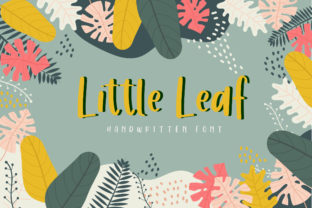
Little Leaf isn’t just another typeface—it’s a burst of energy in letterform. Designed to stand out without shouting, it’s a spunky and bold font that adds character to any design. Its playful look and feel invite attention, spark curiosity, and quietly shift the mood of your work from ordinary to memorable.
What Makes Little Leaf Different?
At first glance, Little Leaf feels friendly and confident—like a well-dressed friend who shows up to a meeting wearing bright socks. It’s a display font, meaning it shines best at larger sizes: headlines, posters, logos, social media banners, or short quotes. Its letters have generous curves, subtle bounce, and a hand-crafted rhythm that avoids rigid uniformity. The “spunky” part comes through in its uneven baseline, lively terminals, and slightly exaggerated x-height—giving it presence without sacrificing readability.
The “bold” in Little Leaf isn’t about weight alone—it’s about attitude. It carries visual confidence, making even simple words like “fresh,” “create,” or “hello” feel intentional and full of life. Unlike ultra-thin or overly geometric fonts, Little Leaf embraces warmth and motion. That makes it especially effective when you want to convey approachability, creativity, or joyful authenticity.
Where Does Little Leaf Fit In Real Life?
Think about the last time you scrolled past a dozen Instagram posts—and paused on one. Chances are, the standout wasn’t just the photo, but the way the text sat on it. Little Leaf works beautifully there: on quote graphics for educators sharing classroom wins, on product labels for small-batch makers, or as a logo mark for a yoga studio, indie bookstore, or children’s illustrator.
Bloggers use it to highlight section headers or pull quotes—adding personality without overwhelming long-form content. Freelancers drop it into proposal covers or portfolio thumbnails to signal they’re thoughtful *and* fun to work with. Educators apply it to classroom posters or digital slide decks where clarity meets charm. Even entrepreneurs testing a new brand name often start with Little Leaf to explore tone before committing to full identity systems.
It’s not meant for body text or dense legal disclaimers—but that’s by design. Little Leaf thrives where voice matters most: the first impression, the emotional hook, the moment someone decides to lean in and stay.
Real Examples You Can Try Today
- A handmade soap label: “Lavender & Oat” set in Little Leaf beside a soft watercolor background—immediately signals care, craft, and calm energy.
- An online course landing page: The headline “Start Your First Illustration Project” in Little Leaf, paired with clean sans-serif subtext—creates contrast that guides the eye and builds trust.
- A teacher’s weekly newsletter: Using Little Leaf for the subject line (“✨ This Week in Science!”) adds lightness and consistency across emails—students (and parents) recognize the tone instantly.
- A café chalkboard menu: Digitally recreated with Little Leaf for social posts—feels human-scaled, seasonal, and unpretentious.
Why People Choose Little Leaf (Beyond Looks)
Design isn’t just decoration—it’s communication. When you choose Little Leaf, you’re choosing to say something specific: that your message has heart, that your brand values expressiveness over perfection, and that you understand how much tone impacts connection.
For beginners, it’s forgiving. You don’t need advanced typography knowledge to use it well—just a sense of balance. Pair it with a neutral, highly legible font (like Open Sans or Lato) for supporting text, and you’ve got an accessible, professional pairing in minutes.
For professionals, it’s a quick lever for differentiation. In crowded digital spaces—email inboxes, Etsy shops, Google Ads—distinctive yet legible typography helps your content cut through noise. Little Leaf delivers that distinction without requiring custom illustration or animation.
Things to Keep in Mind Before You Use It
Because Little Leaf is expressive, it rewards intentionality. Here’s what helps it shine—and what might hold it back:
- Size matters. It performs best above 36pt for print and 24px+ on screen. At tiny sizes, details blur and its charm fades.
- Contrast supports clarity. Always place it against a solid, uncluttered background—or use a subtle stroke/shadow if overlaying photos. Busy textures compete with its energy.
- Licensing is straightforward—but check it. Little Leaf is available for personal and commercial use, but verify the license covers your specific need (e.g., web embedding, app UI, merchandise). Most reputable sources include clear terms.
- It’s not for every brand. A law firm launching a new estate planning service? Probably not the fit. A plant shop launching a “Grow With Us” workshop series? Absolutely.
- Test across devices. While well-hinted, some very light or very bold variants may render differently on older Android devices. Preview on mobile before finalizing campaigns.
Getting Started Is Simple
You don’t need design software to begin exploring Little Leaf. Many free tools—like Canva, Figma (with community fonts), or even Google Slides (via upload)—support custom font use. Start small: redesign one email header, refresh a Pinterest pin, or rework your Instagram bio highlight icon.
Notice how it changes the air around your words. Does “New Collection” feel more exciting? Does “Join Us” sound warmer? That’s Little Leaf doing its quiet, confident work—adding character, inviting engagement, and reminding you that typography can be both purposeful and playful.
It won’t solve every design challenge—but when you need boldness with heart, spunk with sincerity, or a little lift in your visual voice, Little Leaf is ready to help you begin.